
New malwares in town. Not much info available on Google.
Again my AV failed to recognize a malware, but when I saw autoruns and hidden folders named muza and carpet in my pen drive, I got suspicious. These files and folders are system files, so if you cant see them, then you need to go to Tools->Folder options->View and set the following settings:
enable Show hidden files and folders
Hide protected operating system files.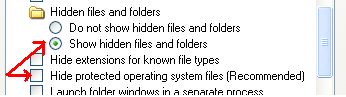
Malwares often attribute themselves as system and hidden to stay invisible.Unfortunately Autoruns and Autoplay were enabled by default on my new system. And it popped the option of "action=Open folder to view files using Windows Explorer". Which could be misleading
as I found the same action in autorun.inf as well. After inspecting the autorun.inf, I believe even if you right click and explore/open its copy gets executed. It has variants in the name of shey.exe and sguza.exe and moves through removable drives. Once its executed you cannot remove the autorun.inf or the hidden folders. I took the help of utility Handle (http://technet.microsoft.com/en-us/sysinternals/bb896655.aspx) by Sysinternals to find out which app has opened the Autorun.inf.
Execute Handle.exe using command prompt and output the results to a text file. And search using CTRL-F for autorun.inf.
And as always it was explorer.exe:
which means the malware is using explorer.exe as a host.
I killed and restarted explorer using task manager.
Alternatively we can use Process Explorer (a tool by sysinternals, which is kindof an advanced Task manager) to inspect the explorer.exe and search for SHEY.EXE or other handles and then close them.
Start process explorer and do a CTRL-F search for any handle with the names: SHEY.EXE, SGUZA,EXE, mrpky.exe 194.EXE, 21782259.EXE OR KITA375[1].EXE, OR autorun.inf:
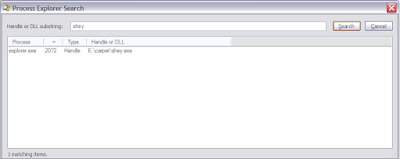
Search for the file names.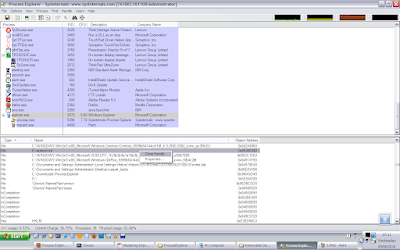
If found, close those handles.
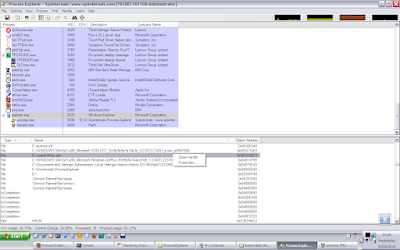
After you kill the malware instance, using Proc Explorer OR by restarting explorer.exe, you will be able to delete the muzo and carpet and autorun.inf files.
I deleted the autoruns and the hidden folders named muza and carpet.
The next step was to clean the registry. So you search for all occurrences of shey.exe and sguza.exe and delete them. The malware may use some other names as well, which I found here:
http://www.prevx.com/filenames/X285138109880396664-X1/SHEY.EXE.html
I found the malware still running inside the explorer with the name : MRPKY.EXE
This file is located in C:\Documents and Settings\your_username\Application Data
Again searching the registry I found an entry in the WinLogon startups: (You may use Autorun and ProcessExplorer tools from Sysinternals for this)
HKEY_LOCAL_MACHINE\SOFTWARE\Microsoft\Windows NT\CurrentVersion\Winlogon\Taskman with a value of C:\Documents and Settings\username\Application Data\mrpky.exe
So I deleted this registry entry and deleted the mrpky.exe as well. I searched for other names but as of now couldnt find any.
I restarted my system, and I am not seeing any weird behavior as of now. If I insert a pen drive, it doesnt show any autorun.inf. Nor I am seeing any suspicious exe or dll in explorer. (using process explorer)
Thats all for now.
Summary:
1. If you cannot delete the hidden folder muza or carpet, then kill the explorer.exe using task manager and restart explorer.exe. This will kill the malware instance.
2. Now delete the hidden folders muza or carpet and then delete then autorun.inf as well from your removable drives.
3. Open registry and search for all keys containing sguza.exe or shey.exe and all other probable names here : http://www.prevx.com/filenames/X285138109880396664-X1/SHEY.EXE.html and delete them.
4. Disable autorun and autoplay.(use links section)
5. If at all, the malware still works then it suggests we missed a copy of it. So when you restart your computer, it will be executed again. But all the instances use explorer.exe as a host, so if you want to kill them, restart explorer. But any undeleted registry entry will restart the malware when you restart windows. That doesnt sound good, but we can wait for the AVs to create a tool or reverse engineer it for more details.
Prevention tips:
Disable autoruns and autoplay for all removable drives. http://support.microsoft.com/kb/967715
Update:
For more details about the malware, you can upload the exe on virustotal.com which provides the AV detection results from various Anti Viruses.Here are the results from the unpacked mrpky.exe:
http://www.virustotal.com/analisis/c887b8c000b422f41a06dc36e0d2a9bf84f114520da0e08cb83dc07005446260-1276933820Links:
Handle by SysInternals: http://technet.microsoft.com/en-us/sysinternals/bb896655.aspx
Turn off autoplay: http://support.microsoft.com/kb/967715
VirusTotal: http://www.virustotal.com/
shell\open\command=muza\\\sguza.exe
shell\open\command=carpet\\\shey.exe
Again my AV failed to recognize a malware, but when I saw autoruns and hidden folders named muza and carpet in my pen drive, I got suspicious. These files and folders are system files, so if you cant see them, then you need to go to Tools->Folder options->View and set the following settings:
enable Show hidden files and folders
Hide protected operating system files.

Malwares often attribute themselves as system and hidden to stay invisible.Unfortunately Autoruns and Autoplay were enabled by default on my new system. And it popped the option of "action=Open folder to view files using Windows Explorer". Which could be misleading
as I found the same action in autorun.inf as well. After inspecting the autorun.inf, I believe even if you right click and explore/open its copy gets executed. It has variants in the name of shey.exe and sguza.exe and moves through removable drives. Once its executed you cannot remove the autorun.inf or the hidden folders. I took the help of utility Handle (http://technet.microsoft.com/en-us/sysinternals/bb896655.aspx) by Sysinternals to find out which app has opened the Autorun.inf.
Execute Handle.exe using command prompt and output the results to a text file. And search using CTRL-F for autorun.inf.
explorer.exe pid: 540 administrator
6E4: Section \BaseNamedObjects\MSCTF.MarshalInterface.FileMap.ECE.B.NMKKAD
6F0: Section \BaseNamedObjects\MSCTF.Shared.SFM.ECE
6F8: File (RWD) C:\Documents and Settings\lada\My Documents\Downloads
700: File (---) E:\autorun.inf
And as always it was explorer.exe:
which means the malware is using explorer.exe as a host.
I killed and restarted explorer using task manager.
Alternatively we can use Process Explorer (a tool by sysinternals, which is kindof an advanced Task manager) to inspect the explorer.exe and search for SHEY.EXE or other handles and then close them.
Start process explorer and do a CTRL-F search for any handle with the names: SHEY.EXE, SGUZA,EXE, mrpky.exe 194.EXE, 21782259.EXE OR KITA375[1].EXE, OR autorun.inf:

Search for the file names.

If found, close those handles.

After you kill the malware instance, using Proc Explorer OR by restarting explorer.exe, you will be able to delete the muzo and carpet and autorun.inf files.
I deleted the autoruns and the hidden folders named muza and carpet.
The next step was to clean the registry. So you search for all occurrences of shey.exe and sguza.exe and delete them. The malware may use some other names as well, which I found here:
http://www.prevx.com/filenames/X285138109880396664-X1/SHEY.EXE.html
I found the malware still running inside the explorer with the name : MRPKY.EXE
This file is located in C:\Documents and Settings\your_username\Application Data
Again searching the registry I found an entry in the WinLogon startups: (You may use Autorun and ProcessExplorer tools from Sysinternals for this)
HKEY_LOCAL_MACHINE\SOFTWARE\Microsoft\Windows NT\CurrentVersion\Winlogon\Taskman with a value of C:\Documents and Settings\username\Application Data\mrpky.exe
So I deleted this registry entry and deleted the mrpky.exe as well. I searched for other names but as of now couldnt find any.
I restarted my system, and I am not seeing any weird behavior as of now. If I insert a pen drive, it doesnt show any autorun.inf. Nor I am seeing any suspicious exe or dll in explorer. (using process explorer)
Thats all for now.
Summary:
1. If you cannot delete the hidden folder muza or carpet, then kill the explorer.exe using task manager and restart explorer.exe. This will kill the malware instance.
2. Now delete the hidden folders muza or carpet and then delete then autorun.inf as well from your removable drives.
3. Open registry and search for all keys containing sguza.exe or shey.exe and all other probable names here : http://www.prevx.com/filenames/X285138109880396664-X1/SHEY.EXE.html and delete them.
4. Disable autorun and autoplay.(use links section)
5. If at all, the malware still works then it suggests we missed a copy of it. So when you restart your computer, it will be executed again. But all the instances use explorer.exe as a host, so if you want to kill them, restart explorer. But any undeleted registry entry will restart the malware when you restart windows. That doesnt sound good, but we can wait for the AVs to create a tool or reverse engineer it for more details.
Prevention tips:
Disable autoruns and autoplay for all removable drives. http://support.microsoft.com/kb/967715
Update:
For more details about the malware, you can upload the exe on virustotal.com which provides the AV detection results from various Anti Viruses.Here are the results from the unpacked mrpky.exe:
http://www.virustotal.com/analisis/c887b8c000b422f41a06dc36e0d2a9bf84f114520da0e08cb83dc07005446260-1276933820Links:
Handle by SysInternals: http://technet.microsoft.com/en-us/sysinternals/bb896655.aspx
Turn off autoplay: http://support.microsoft.com/kb/967715
VirusTotal: http://www.virustotal.com/


