Showing posts with label SSL TLS and Crypto. Show all posts

Tuesday, October 28, 2014

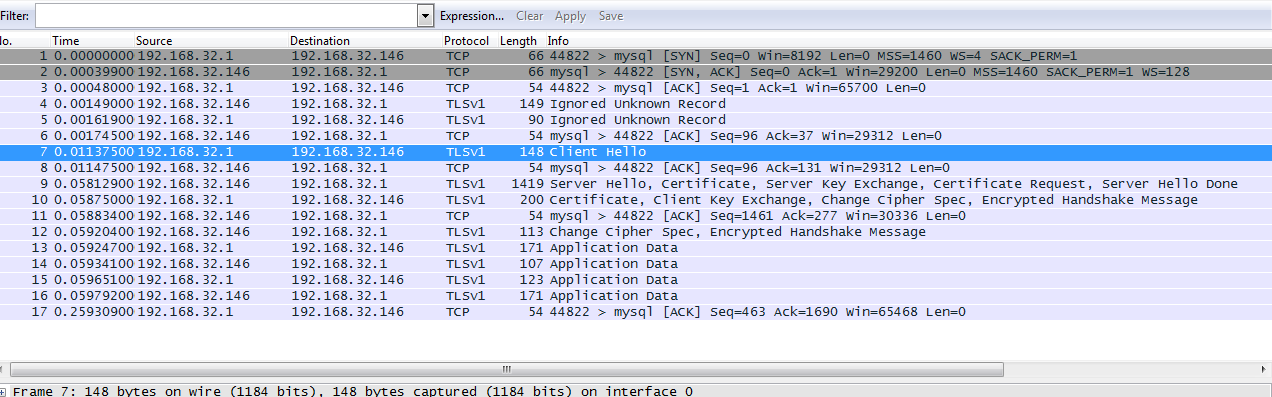
Mysql TLSv1 capture using Wireshark

I installed mysql and enabled SSL on it. And I was just wondering how to see if the encryption is really working. I dont know what SSL protocol mysql uses for encryption.

So I started wireshark and captured login using a remote machine.

The default capture will show you the protocol as mysql,


but inorder to see the SSL/TLS you need to decode the packets as SSL. The SSL handshake does not occur first, but is followed after a few mysql packet exchanges.


[Ubuntu 14.04] mysql with SSL: ERROR 2026 (HY000): SSL connection error: protocol version mismatch


I was trying to enable SSL on mysql in Ubuntu 14.04 and it was not easy.

1. Install simply, apt-get install mysql-client mysql-server and set a strong root password.
2. Generate openssl certs and enable SSL configurations in /etc/mysql/my.cnf like this:

#For the client: (localhost only)

[client]
port            = 3306
socket          = /var/run/mysqld/mysqld.sock
ssl=1
ssl-ca          = /etc/mysql/ca-cert.pem

[mysqld]
....
ssl=1
ssl-ca=/etc/mysql/ca-cert.pem
ssl-cert=/etc/mysql/server-cert.pem
ssl-key=/etc/mysql/server-key.pem
ssl-cipher=DHE-RSA-AES256-SHA

Restart mysql, thats it. But while trying to connect (mysql -u root -p), I faced an error:

ERROR 2026 (HY000): SSL connection error: protocol version mismatch

Later I figured out, it was due to Bad certificates (well kind of..),

So generate the certificates using the commands here:
http://askubuntu.com/questions/194074/enabling-ssl-in-mysql

Once you connect, you can /s to confirm that your cipher is on:

--------------------------------------------------------------------------------------------

mysql -u root -p
Enter password:
Welcome to the MySQL monitor.  Commands end with ; or \g.
Your MySQL connection id is 36
Server version: 5.5.38-0ubuntu0.14.04.1 (Ubuntu)

Copyright (c) 2000, 2014, Oracle and/or its affiliates. All rights reserved.

Oracle is a registered trademark of Oracle Corporation and/or its
affiliates. Other names may be trademarks of their respective
owners.

Type 'help;' or '\h' for help. Type '\c' to clear the current input statement.

mysql> \s
--------------
mysql  Ver 14.14 Distrib 5.5.38, for debian-linux-gnu (i686) using readline 6.3

Connection id: 36
Current database:
Current user: root@localhost
SSL: Cipher in use is DHE-RSA-AES256-SHA
Current pager: stdout
Using outfile: ''
Using delimiter: ;
Server version: 5.5.38-0ubuntu0.14.04.1 (Ubuntu)
Protocol version: 10
Connection: Localhost via UNIX socket
Server characterset: latin1
Db     characterset: latin1
Client characterset: utf8
Conn.  characterset: utf8
UNIX socket: /var/run/mysqld/mysqld.sock
Uptime: 11 days 1 hour 4 min 49 sec

Threads: 1  Questions: 109  Slow queries: 0  Opens: 171  Flush tables: 1  Open tables: 41  Queries per second avg: 0.000
--------------

mysql>

--------------------------------------------------------------------------------------------

Now if you want to see mysql SSL in action using wireshark,

http://rhosted.blogspot.in/2014/10/mysql-tlsv1-capture-using-wireshark.html

More references:
http://askubuntu.com/questions/194074/enabling-ssl-in-mysql

Thursday, September 4, 2014

pcap.h: No such file or directory, /usr/bin/ld: cannot find -lpcap


thc-ipv6-lib.c:39:18: error: pcap.h: No such file or directory
In file included from thc-ipv6-lib.c:40:
..
/usr/bin/ld: cannot find -lpcap
collect2: ld returned 1 exit status
This is a very basic stuff, but helps me making a note of what I did. If the gcc compiler is unable to locate the source headers or the libraries, just find the location and compile it quickly. My old machine didnt have a pcap library installed, but I found an old nmap install which had its own pcap library. So just use -I and -L flags to specify the location of source files and library files respectively and get your job done. Nothing impressive about it. 

http://www.network-theory.co.uk/docs/gccintro/gccintro_21.html

[root@ani thc-ipv6-2.5]# make
gcc -O2 -D_HAVE_SSL -c -o thc-ipv6-lib.o thc-ipv6-lib.c
thc-ipv6-lib.c:39:18: error: pcap.h: No such file or directory
In file included from thc-ipv6-lib.c:40:
....
Ran a find for pcap.h (find / -name pcap.h) which returned something like /tools/scanners/nmap-6.01/libpcap/pcap.h

[root@ani thc-ipv6-2.5]# gcc -O2 -D_HAVE_SSL -I/tools/scanners/nmap-6.01/libpcap -c -o thc-ipv6-lib.o thc-ipv6-lib.c
Then again another problemo,

[root@ani thc-ipv6-2.5]# make
gcc -O2 -D_HAVE_SSL -o parasite6 parasite6.c thc-ipv6-lib.o -I/tools/scanners/nmap-6.01/libpcap -lpcap -lssl -lcrypto
/usr/bin/ld: cannot find -lpcap
collect2: ld returned 1 exit status
make: *** [parasite6] Error 1
edit Makefile, include the pcap library and header source location:

LDFLAGS+=-I/tools/scanners/nmap-6.01/libpcap -L/tools/scanners/nmap-6.01/libpcap -lpcap $(if $(HAVE_SSL),-lssl -lcrypto,)
and then you go..

[root@ani thc-ipv6-2.5]# make
gcc -O2 -D_HAVE_SSL -o parasite6 parasite6.c thc-ipv6-lib.o -I/tools/scanners/nmap-6.01/libpcap -L/tools/scanners/nmap-6.01/libpcap -lpcap -lssl -lcrypto
gcc -O2 -D_HAVE_SSL -o dos-new-ip6 dos-new-ip6.c thc-ipv6-lib.o -I/tools/scanners/nmap-6.01/libpcap -L/tools/scanners/nmap-6.01/libpcap -lpcap -lssl -lcrypto
gcc -O2 -D_HAVE_SSL -o detect-new-ip6 detect-new-ip6.c thc-ipv6-lib.o -I/tools/scanners/nmap-6.01/libpcap -L/tools/scanners/nmap-6.01/libpcap -lpcap -lssl -lcrypto
gcc -O2 -D_HAVE_SSL -o fake_router6 fake_router6.c thc-ipv6-lib.o -I/tools/scanners/nmap-6.01/libpcap -L/tools/scanners/nmap-6.01/libpcap -lpcap -lssl -lcrypto
....
And for the remaining tools:
[root@ani thc-ipv6-2.5]# make
gcc -O2 -D_HAVE_SSL -o dnssecwalk dnssecwalk.c
In file included from dnssecwalk.c:24:
thc-ipv6.h:14:18: error: pcap.h: No such file or directory
In file included from dnssecwalk.c:24:
..
Just compile it with the correct arguments:

[root@ani thc-ipv6-2.5]# gcc -O2 -I/tools/scanners/nmap-6.01/libpcap -D_HAVE_SSL -o dnssecwalk dnssecwalk.c


Sunday, August 31, 2014

JSSE based SSL ciphersuite tester


Just performs a handshake with the list of JSSE ciphers with the SSL server. If handshake is successful it marks it as a success. This is more of a test for Java based SSL clients which use JSSE for SSL/TLS communication. This code relies heavily on the underlying implementation provided by Java JDK/JSSE. Use it with 1.7 as a lot of cipher support has been added. As I mentioned, this is not a true SSL cipher scanner, because it depends on what ciphersuites have been enabled by JSSE. The server might support other ciphers that are not yet implemented by JSSE, but they wont turn up in the results. Actually if you can read from the raw SSL handshake packets, you can understand what the server SSL supports, you do not need java implementation for that.

package com.ssl.test;

import java.util.ArrayList;
import java.util.Collections;

import javax.net.ssl.SSLSocket;
import javax.net.ssl.SSLSocketFactory;

public class SSLTesting {

 private static final int PORT_TARGET = 443;
 private static final String HOST = "www.example.com";
 private static final String PROTO_SSLV3 = "SSLv3";
 private static final String PROTO_TLSV1 = "TLSv1";
 private static final String PROTO_TLSV11 = "TLSv1.1";
 private static final String PROTO_TLSV12 = "TLSv1.2";
 private static final boolean VERBOSE = false;
 
 // Note 1: Standard names for all the cipher suites, not all are yet implemented
 // http://docs.oracle.com/javase/7/docs/technotes/guides/security/StandardNames.html#ciphersuites

 // Note 2: All the ones supported by Java 7
 // http://docs.oracle.com/javase/7/docs/technotes/guides/security/SunProviders.html#SunJSSEProvider
 
 //See Note 2.
 private static final String jsseCiphersDisabledByDefault = "TLS_DH_anon_WITH_AES_256_CBC_SHA256:TLS_ECDH_anon_WITH_AES_256_CBC_SHA:TLS_DH_anon_WITH_AES_256_CBC_SHA:"
   + "TLS_DH_anon_WITH_AES_128_CBC_SHA256:TLS_ECDH_anon_WITH_AES_128_CBC_SHA:TLS_DH_anon_WITH_AES_128_CBC_SHA:TLS_ECDH_anon_WITH_RC4_128_SHA:"
   + "SSL_DH_anon_WITH_RC4_128_MD5:TLS_ECDH_anon_WITH_3DES_EDE_CBC_SHA:SSL_DH_anon_WITH_3DES_EDE_CBC_SHA:TLS_RSA_WITH_NULL_SHA256:"
   + "TLS_ECDHE_ECDSA_WITH_NULL_SHA:TLS_ECDHE_RSA_WITH_NULL_SHA:SSL_RSA_WITH_NULL_SHA:TLS_ECDH_ECDSA_WITH_NULL_SHA:TLS_ECDH_RSA_WITH_NULL_SHA:"
   + "TLS_ECDH_anon_WITH_NULL_SHA:SSL_RSA_WITH_NULL_MD5:SSL_RSA_WITH_DES_CBC_SHA:SSL_DHE_RSA_WITH_DES_CBC_SHA:SSL_DHE_DSS_WITH_DES_CBC_SHA:"
   + "SSL_DH_anon_WITH_DES_CBC_SHA:SSL_RSA_EXPORT_WITH_RC4_40_MD5:SSL_DH_anon_EXPORT_WITH_RC4_40_MD5:SSL_RSA_EXPORT_WITH_DES40_CBC_SHA:"
   + "SSL_DHE_RSA_EXPORT_WITH_DES40_CBC_SHA:SSL_DHE_DSS_EXPORT_WITH_DES40_CBC_SHA:SSL_DH_anon_EXPORT_WITH_DES40_CBC_SHA:TLS_KRB5_WITH_RC4_128_SHA:"
   + "TLS_KRB5_WITH_RC4_128_MD5:TLS_KRB5_WITH_3DES_EDE_CBC_SHA:TLS_KRB5_WITH_3DES_EDE_CBC_MD5:TLS_KRB5_WITH_DES_CBC_SHA:TLS_KRB5_WITH_DES_CBC_MD5:"
   + "TLS_KRB5_EXPORT_WITH_RC4_40_SHA:TLS_KRB5_EXPORT_WITH_RC4_40_MD5:TLS_KRB5_EXPORT_WITH_DES_CBC_40_SHA:TLS_KRB5_EXPORT_WITH_DES_CBC_40_MD5";
    //See Note 2.
 private static final String jsseCiphersEnabledByDefault = "TLS_ECDHE_ECDSA_WITH_AES_256_CBC_SHA384:TLS_ECDHE_RSA_WITH_AES_256_CBC_SHA384:TLS_RSA_WITH_AES_256_CBC_SHA256:"
   + "TLS_ECDH_ECDSA_WITH_AES_256_CBC_SHA384:TLS_ECDH_RSA_WITH_AES_256_CBC_SHA384:TLS_DHE_RSA_WITH_AES_256_CBC_SHA256:"
   + "TLS_DHE_DSS_WITH_AES_256_CBC_SHA256:TLS_ECDHE_ECDSA_WITH_AES_256_CBC_SHA:TLS_ECDHE_RSA_WITH_AES_256_CBC_SHA:TLS_RSA_WITH_AES_256_CBC_SHA:"
   + "TLS_ECDH_ECDSA_WITH_AES_256_CBC_SHA:TLS_ECDH_RSA_WITH_AES_256_CBC_SHA:TLS_DHE_RSA_WITH_AES_256_CBC_SHA:TLS_DHE_DSS_WITH_AES_256_CBC_SHA:"
   + "TLS_ECDHE_ECDSA_WITH_AES_128_CBC_SHA256:TLS_ECDHE_RSA_WITH_AES_128_CBC_SHA256:TLS_RSA_WITH_AES_128_CBC_SHA256:TLS_ECDH_ECDSA_WITH_AES_128_CBC_SHA256:"
   + "TLS_ECDH_RSA_WITH_AES_128_CBC_SHA256:TLS_DHE_RSA_WITH_AES_128_CBC_SHA256:TLS_DHE_DSS_WITH_AES_128_CBC_SHA256:TLS_ECDHE_ECDSA_WITH_AES_128_CBC_SHA:"
   + "TLS_ECDHE_RSA_WITH_AES_128_CBC_SHA:TLS_RSA_WITH_AES_128_CBC_SHA:TLS_ECDH_ECDSA_WITH_AES_128_CBC_SHA:TLS_ECDH_RSA_WITH_AES_128_CBC_SHA:"
   + "TLS_DHE_RSA_WITH_AES_128_CBC_SHA:TLS_DHE_DSS_WITH_AES_128_CBC_SHA:TLS_ECDHE_ECDSA_WITH_RC4_128_SHA:TLS_ECDHE_RSA_WITH_RC4_128_SHA:"
   + "SSL_RSA_WITH_RC4_128_SHA:TLS_ECDH_ECDSA_WITH_RC4_128_SHA:TLS_ECDH_RSA_WITH_RC4_128_SHA:TLS_ECDHE_ECDSA_WITH_3DES_EDE_CBC_SHA:"
   + "TLS_ECDHE_RSA_WITH_3DES_EDE_CBC_SHA:SSL_RSA_WITH_3DES_EDE_CBC_SHA:TLS_ECDH_ECDSA_WITH_3DES_EDE_CBC_SHA:TLS_ECDH_RSA_WITH_3DES_EDE_CBC_SHA:"
   + "SSL_DHE_RSA_WITH_3DES_EDE_CBC_SHA:SSL_DHE_DSS_WITH_3DES_EDE_CBC_SHA:SSL_RSA_WITH_RC4_128_MD5:TLS_EMPTY_RENEGOTIATION_INFO_SCSV";
 
 //A lot of them are not yet supported on jsse, See Note 1.
 private static final String jsseCompleteCipherList = "SSL_DH_anon_EXPORT_WITH_DES40_CBC_SHA:SSL_DH_anon_EXPORT_WITH_RC4_40_MD5:SSL_DH_anon_WITH_3DES_EDE_CBC_SHA:"
   + "TLS_DH_anon_WITH_AES_128_CBC_SHA:TLS_DH_anon_WITH_AES_128_CBC_SHA256:TLS_DH_anon_WITH_AES_128_GCM_SHA256:TLS_DH_anon_WITH_AES_256_CBC_SHA:"
   + "TLS_DH_anon_WITH_AES_256_CBC_SHA256:TLS_DH_anon_WITH_AES_256_GCM_SHA384:TLS_DH_anon_WITH_CAMELLIA_128_CBC_SHA:TLS_DH_anon_WITH_CAMELLIA_128_CBC_SHA256:"
   + "TLS_DH_anon_WITH_CAMELLIA_256_CBC_SHA:TLS_DH_anon_WITH_CAMELLIA_256_CBC_SHA256:SSL_DH_anon_WITH_DES_CBC_SHA:SSL_DH_anon_WITH_RC4_128_MD5:"
   + "TLS_DH_anon_WITH_SEED_CBC_SHA:SSL_DH_DSS_EXPORT_WITH_DES40_CBC_SHA:SSL_DH_DSS_WITH_3DES_EDE_CBC_SHA:TLS_DH_DSS_WITH_AES_128_CBC_SHA:"
   + "TLS_DH_DSS_WITH_AES_128_CBC_SHA256:TLS_DH_DSS_WITH_AES_128_GCM_SHA256:TLS_DH_DSS_WITH_AES_256_CBC_SHA:TLS_DH_DSS_WITH_AES_256_CBC_SHA256:"
   + "TLS_DH_DSS_WITH_AES_256_GCM_SHA384:TLS_DH_DSS_WITH_CAMELLIA_128_CBC_SHA:TLS_DH_DSS_WITH_CAMELLIA_128_CBC_SHA256:TLS_DH_DSS_WITH_CAMELLIA_256_CBC_SHA:"
   + "TLS_DH_DSS_WITH_CAMELLIA_256_CBC_SHA256:SSL_DH_DSS_WITH_DES_CBC_SHA:TLS_DH_DSS_WITH_SEED_CBC_SHA:SSL_DH_RSA_EXPORT_WITH_DES40_CBC_SHA:"
   + "SSL_DH_RSA_WITH_3DES_EDE_CBC_SHA:TLS_DH_RSA_WITH_AES_128_CBC_SHA:TLS_DH_RSA_WITH_AES_128_CBC_SHA256:TLS_DH_RSA_WITH_AES_128_GCM_SHA256:"
   + "TLS_DH_RSA_WITH_AES_256_CBC_SHA:TLS_DH_RSA_WITH_AES_256_CBC_SHA256:TLS_DH_RSA_WITH_AES_256_GCM_SHA384:TLS_DH_RSA_WITH_CAMELLIA_128_CBC_SHA:"
   + "TLS_DH_RSA_WITH_CAMELLIA_128_CBC_SHA256:TLS_DH_RSA_WITH_CAMELLIA_256_CBC_SHA:TLS_DH_RSA_WITH_CAMELLIA_256_CBC_SHA256:SSL_DH_RSA_WITH_DES_CBC_SHA:"
   + "TLS_DH_RSA_WITH_SEED_CBC_SHA:SSL_DHE_DSS_EXPORT_WITH_DES40_CBC_SHA:SSL_DHE_DSS_EXPORT1024_WITH_DES_CBC_SHA:SSL_DHE_DSS_EXPORT1024_WITH_RC4_56_SHA:"
   + "SSL_DHE_DSS_WITH_3DES_EDE_CBC_SHA:TLS_DHE_DSS_WITH_AES_128_CBC_SHA:TLS_DHE_DSS_WITH_AES_128_CBC_SHA256:TLS_DHE_DSS_WITH_AES_128_GCM_SHA256:"
   + "TLS_DHE_DSS_WITH_AES_256_CBC_SHA:TLS_DHE_DSS_WITH_AES_256_CBC_SHA256:TLS_DHE_DSS_WITH_AES_256_GCM_SHA384:TLS_DHE_DSS_WITH_CAMELLIA_128_CBC_SHA:"
   + "TLS_DHE_DSS_WITH_CAMELLIA_128_CBC_SHA256:TLS_DHE_DSS_WITH_CAMELLIA_256_CBC_SHA:TLS_DHE_DSS_WITH_CAMELLIA_256_CBC_SHA256:SSL_DHE_DSS_WITH_DES_CBC_SHA:"
   + "SSL_DHE_DSS_WITH_RC4_128_SHA:TLS_DHE_DSS_WITH_SEED_CBC_SHA:TLS_DHE_PSK_WITH_3DES_EDE_CBC_SHA:TLS_DHE_PSK_WITH_AES_128_CBC_SHA:"
   + "TLS_DHE_PSK_WITH_AES_128_CBC_SHA256:TLS_DHE_PSK_WITH_AES_128_GCM_SHA256:TLS_DHE_PSK_WITH_AES_256_CBC_SHA:TLS_DHE_PSK_WITH_AES_256_CBC_SHA384:"
   + "TLS_DHE_PSK_WITH_AES_256_GCM_SHA384:TLS_DHE_PSK_WITH_NULL_SHA:TLS_DHE_PSK_WITH_NULL_SHA256:TLS_DHE_PSK_WITH_NULL_SHA384:"
   + "TLS_DHE_PSK_WITH_RC4_128_SHA:SSL_DHE_RSA_EXPORT_WITH_DES40_CBC_SHA:SSL_DHE_RSA_WITH_3DES_EDE_CBC_SHA:TLS_DHE_RSA_WITH_AES_128_CBC_SHA:"
   + "TLS_DHE_RSA_WITH_AES_128_CBC_SHA256:TLS_DHE_RSA_WITH_AES_128_GCM_SHA256:TLS_DHE_RSA_WITH_AES_256_CBC_SHA:TLS_DHE_RSA_WITH_AES_256_CBC_SHA256:"
   + "TLS_DHE_RSA_WITH_AES_256_GCM_SHA384:TLS_DHE_RSA_WITH_CAMELLIA_128_CBC_SHA:TLS_DHE_RSA_WITH_CAMELLIA_128_CBC_SHA256:TLS_DHE_RSA_WITH_CAMELLIA_256_CBC_SHA:"
   + "TLS_DHE_RSA_WITH_CAMELLIA_256_CBC_SHA256:SSL_DHE_RSA_WITH_DES_CBC_SHA:TLS_DHE_RSA_WITH_SEED_CBC_SHA:TLS_ECDH_anon_WITH_3DES_EDE_CBC_SHA:"
   + "TLS_ECDH_anon_WITH_AES_128_CBC_SHA:TLS_ECDH_anon_WITH_AES_256_CBC_SHA:TLS_ECDH_anon_WITH_NULL_SHA:TLS_ECDH_anon_WITH_RC4_128_SHA:"
   + "TLS_ECDH_ECDSA_WITH_3DES_EDE_CBC_SHA:TLS_ECDH_ECDSA_WITH_AES_128_CBC_SHA:TLS_ECDH_ECDSA_WITH_AES_128_CBC_SHA256:TLS_ECDH_ECDSA_WITH_AES_128_GCM_SHA256:"
   + "TLS_ECDH_ECDSA_WITH_AES_256_CBC_SHA:TLS_ECDH_ECDSA_WITH_AES_256_CBC_SHA384:TLS_ECDH_ECDSA_WITH_AES_256_GCM_SHA384:TLS_ECDH_ECDSA_WITH_NULL_SHA:"
   + "TLS_ECDH_ECDSA_WITH_RC4_128_SHA:TLS_ECDH_RSA_WITH_3DES_EDE_CBC_SHA:TLS_ECDH_RSA_WITH_AES_128_CBC_SHA:TLS_ECDH_RSA_WITH_AES_128_CBC_SHA256:"
   + "TLS_ECDH_RSA_WITH_AES_128_GCM_SHA256:TLS_ECDH_RSA_WITH_AES_256_CBC_SHA:TLS_ECDH_RSA_WITH_AES_256_CBC_SHA384:TLS_ECDH_RSA_WITH_AES_256_GCM_SHA384:"
   + "TLS_ECDH_RSA_WITH_NULL_SHA:TLS_ECDH_RSA_WITH_RC4_128_SHA:TLS_ECDHE_ECDSA_WITH_3DES_EDE_CBC_SHA:TLS_ECDHE_ECDSA_WITH_AES_128_CBC_SHA:"
   + "TLS_ECDHE_ECDSA_WITH_AES_128_CBC_SHA256:TLS_ECDHE_ECDSA_WITH_AES_128_GCM_SHA256:TLS_ECDHE_ECDSA_WITH_AES_256_CBC_SHA:"
   + "TLS_ECDHE_ECDSA_WITH_AES_256_CBC_SHA384:TLS_ECDHE_ECDSA_WITH_AES_256_GCM_SHA384:TLS_ECDHE_ECDSA_WITH_NULL_SHA:TLS_ECDHE_ECDSA_WITH_RC4_128_SHA:"
   + "TLS_ECDHE_PSK_WITH_3DES_EDE_CBC_SHA:TLS_ECDHE_PSK_WITH_AES_128_CBC_SHA:TLS_ECDHE_PSK_WITH_AES_128_CBC_SHA256:TLS_ECDHE_PSK_WITH_AES_256_CBC_SHA:"
   + "TLS_ECDHE_PSK_WITH_AES_256_CBC_SHA384:TLS_ECDHE_PSK_WITH_NULL_SHA:TLS_ECDHE_PSK_WITH_NULL_SHA256:TLS_ECDHE_PSK_WITH_NULL_SHA384:"
   + "TLS_ECDHE_PSK_WITH_RC4_128_SHA:TLS_ECDHE_RSA_WITH_3DES_EDE_CBC_SHA:TLS_ECDHE_RSA_WITH_AES_128_CBC_SHA:TLS_ECDHE_RSA_WITH_AES_128_CBC_SHA256:"
   + "TLS_ECDHE_RSA_WITH_AES_128_GCM_SHA256:TLS_ECDHE_RSA_WITH_AES_256_CBC_SHA:TLS_ECDHE_RSA_WITH_AES_256_CBC_SHA384:TLS_ECDHE_RSA_WITH_AES_256_GCM_SHA384:"
   + "TLS_ECDHE_RSA_WITH_NULL_SHA:TLS_ECDHE_RSA_WITH_RC4_128_SHA:TLS_EMPTY_RENEGOTIATION_INFO_SCSV:SSL_FORTEZZA_DMS_WITH_FORTEZZA_CBC_SHA:"
   + "SSL_FORTEZZA_DMS_WITH_NULL_SHA:TLS_KRB5_EXPORT_WITH_DES_CBC_40_MD5:TLS_KRB5_EXPORT_WITH_DES_CBC_40_SHA:TLS_KRB5_EXPORT_WITH_RC2_CBC_40_MD5:"
   + "TLS_KRB5_EXPORT_WITH_RC2_CBC_40_SHA:TLS_KRB5_EXPORT_WITH_RC4_40_MD5:TLS_KRB5_EXPORT_WITH_RC4_40_SHA:TLS_KRB5_WITH_3DES_EDE_CBC_MD5:"
   + "TLS_KRB5_WITH_3DES_EDE_CBC_SHA:TLS_KRB5_WITH_DES_CBC_MD5:TLS_KRB5_WITH_DES_CBC_SHA:TLS_KRB5_WITH_IDEA_CBC_MD5:TLS_KRB5_WITH_IDEA_CBC_SHA:"
   + "TLS_KRB5_WITH_RC4_128_MD5:TLS_KRB5_WITH_RC4_128_SHA:TLS_PSK_WITH_3DES_EDE_CBC_SHA:TLS_PSK_WITH_AES_128_CBC_SHA:TLS_PSK_WITH_AES_128_CBC_SHA256:"
   + "TLS_PSK_WITH_AES_128_GCM_SHA256:TLS_PSK_WITH_AES_256_CBC_SHA:TLS_PSK_WITH_AES_256_CBC_SHA384:TLS_PSK_WITH_AES_256_GCM_SHA384:TLS_PSK_WITH_NULL_SHA:"
   + "TLS_PSK_WITH_NULL_SHA256:TLS_PSK_WITH_NULL_SHA384:TLS_PSK_WITH_RC4_128_SHA:SSL_RSA_EXPORT_WITH_DES40_CBC_SHA:SSL_RSA_EXPORT_WITH_RC2_CBC_40_MD5:"
   + "SSL_RSA_EXPORT_WITH_RC4_40_MD5:SSL_RSA_EXPORT1024_WITH_DES_CBC_SHA:SSL_RSA_EXPORT1024_WITH_RC4_56_SHA:SSL_RSA_FIPS_WITH_3DES_EDE_CBC_SHA:"
   + "SSL_RSA_FIPS_WITH_DES_CBC_SHA:TLS_RSA_PSK_WITH_3DES_EDE_CBC_SHA:TLS_RSA_PSK_WITH_AES_128_CBC_SHA:TLS_RSA_PSK_WITH_AES_128_CBC_SHA256:"
   + "TLS_RSA_PSK_WITH_AES_128_GCM_SHA256:TLS_RSA_PSK_WITH_AES_256_CBC_SHA:TLS_RSA_PSK_WITH_AES_256_CBC_SHA384:TLS_RSA_PSK_WITH_AES_256_GCM_SHA384:"
   + "TLS_RSA_PSK_WITH_NULL_SHA:TLS_RSA_PSK_WITH_NULL_SHA256:TLS_RSA_PSK_WITH_NULL_SHA384:TLS_RSA_PSK_WITH_RC4_128_SHA:SSL_RSA_WITH_3DES_EDE_CBC_SHA:"
   + "TLS_RSA_WITH_AES_128_CBC_SHA:TLS_RSA_WITH_AES_128_CBC_SHA256:TLS_RSA_WITH_AES_128_GCM_SHA256:TLS_RSA_WITH_AES_256_CBC_SHA:TLS_RSA_WITH_AES_256_CBC_SHA256:"
   + "TLS_RSA_WITH_AES_256_GCM_SHA384:TLS_RSA_WITH_CAMELLIA_128_CBC_SHA:TLS_RSA_WITH_CAMELLIA_128_CBC_SHA256:TLS_RSA_WITH_CAMELLIA_256_CBC_SHA:"
   + "TLS_RSA_WITH_CAMELLIA_256_CBC_SHA256:SSL_RSA_WITH_DES_CBC_SHA:SSL_RSA_WITH_IDEA_CBC_SHA:SSL_RSA_WITH_NULL_MD5:SSL_RSA_WITH_NULL_SHA:"
   + "TLS_RSA_WITH_NULL_SHA256:SSL_RSA_WITH_RC4_128_MD5:SSL_RSA_WITH_RC4_128_SHA:TLS_RSA_WITH_SEED_CBC_SHA:TLS_SRP_SHA_DSS_WITH_3DES_EDE_CBC_SHA:"
   + "TLS_SRP_SHA_DSS_WITH_AES_128_CBC_SHA:TLS_SRP_SHA_DSS_WITH_AES_256_CBC_SHA:TLS_SRP_SHA_RSA_WITH_3DES_EDE_CBC_SHA:TLS_SRP_SHA_RSA_WITH_AES_128_CBC_SHA:"
   + "TLS_SRP_SHA_RSA_WITH_AES_256_CBC_SHA:TLS_SRP_SHA_WITH_3DES_EDE_CBC_SHA:TLS_SRP_SHA_WITH_AES_128_CBC_SHA:TLS_SRP_SHA_WITH_AES_256_CBC_SHA";
 
 public static void main(String[] args) throws Exception {
  String ciphers = jsseCiphersEnabledByDefault + ":" + jsseCiphersDisabledByDefault;
  System.out.println("Using Hostname : port = " + HOST + " : " + PORT_TARGET);
   
  //test enabled and the ones that disabled by default
   testSSL(HOST, PORT_TARGET, PROTO_SSLV3, ciphers);
   testSSL(HOST, PORT_TARGET, PROTO_TLSV1, ciphers);
   testSSL(HOST, PORT_TARGET, PROTO_TLSV11, ciphers);
   testSSL(HOST, PORT_TARGET, PROTO_TLSV12, ciphers);
     
  //test weak ciphers
  /* testSSL(HOST, PORT_TARGET, PROTO_SSLV3, jsseCiphersDisabledByDefault);
   testSSL(HOST, PORT_TARGET, PROTO_TLSV1, jsseCiphersDisabledByDefault);
   testSSL(HOST, PORT_TARGET, PROTO_TLSV11, jsseCiphersDisabledByDefault);
   testSSL(HOST, PORT_TARGET, PROTO_TLSV12, jsseCiphersDisabledByDefault);*/
 
 
 }

 private static void testSSL(String hostname, int port, String version, String cipherSuitesToTest) {
  try {
   System.out.println("-------------------------");
   System.out.println("Protocol : " + version);
   ArrayList success = new ArrayList();
   ArrayList unsupported = new ArrayList();
   ArrayList fail = new ArrayList();
   SSLSocketFactory factory = (SSLSocketFactory) SSLSocketFactory
     .getDefault();
   SSLSocket socket = (SSLSocket) factory.createSocket(hostname, port);
   //set the SSL version to be used
   String[] prots = { version };
   socket.setEnabledProtocols(prots);

   String[] cipherSuitesClient = cipherSuitesToTest.split(":");

   for (String ciphers : cipherSuitesClient) {
    socket = (SSLSocket) factory.createSocket(hostname, port);
    socket.setEnabledProtocols(prots);
    String[] array = { ciphers };
    //try making a handshake
    try {
    socket.setEnabledCipherSuites(array);
     socket.startHandshake();
     success.add(ciphers);
    } catch (javax.net.ssl.SSLHandshakeException e) {
     fail.add(ciphers);
    } catch (java.lang.IllegalArgumentException e){
     if (e.getMessage().contains("Unsupported ciphersuite") || e.getMessage().contains("Cannot support"))
      unsupported.add(ciphers);
     else
      e.printStackTrace();
    }
    catch (Exception e) {
     System.out.println(ciphers + ":" + e.getClass() + " "
       + e.getMessage());
    }
    socket.close();
   }
   System.out.println("Testing " + version + " ciphers. Count: "
     + cipherSuitesClient.length);
   System.out.println("Successful Handshake count = "
     + success.size());
   Collections.sort(success);
   for (String name : success) {
    System.out.println("[" + version + "]" + " +" + name);
   }
   
   System.out.println("Unsupported list. Count = " + unsupported.size());
   Collections.sort(unsupported);
   if(VERBOSE){
   for (String name : unsupported) {
    System.out.println("[" + version + "]" + "XXX " + name);
   }
   }

   System.out.println("Handshake Failed Count = " + fail.size());
   if(VERBOSE){
   for (String name : fail) {
     System.out.println("[" + version + "]" + "-" + name);
   }
   }

  } catch (Exception e) {
   e.printStackTrace();
  }
 }
}

Saturday, August 30, 2014

Java/JSSE Handshake SSL/TLS exceptions

If you are facing some of the below errors, it might mean you are using a Java that does not have the support for the thing you are trying to do:

Example 1: Illegal argument exceptions for protocol version
You are enabling TLS 1.1 and TLS 1.2, but it may give you an exception if you are using Java 1.6. 1.6 does not support TLS 1.1 and TLS 1.2. You can check here as it supports only SSLv3 and TLSv1 (See Support classes and Interfaces section and see the possible values for SSLContext):


http://docs.oracle.com/javase/6/docs/technotes/guides/security/jsse/JSSERefGuide.html

...
String[] protocols = {"TLSv1.1", "TLSv1.2"};
socket = (SSLSocket) factory.createSocket(hostname, port);
    socket.setEnabledProtocols(protocols);
...

-------------------------
Protocol : TLSv1.1
java.lang.IllegalArgumentException: TLSv1.1
    at com.sun.net.ssl.internal.ssl.ProtocolVersion.valueOf(ProtocolVersion.java:133)
    at com.sun.net.ssl.internal.ssl.ProtocolList.(ProtocolList.java:38)
    at com.sun.net.ssl.internal.ssl.SSLSocketImpl.setEnabledProtocols(SSLSocketImpl.java:2202)
    at com.ssl.test.SSLTesting.testSSL(SSLTesting.java:177)
    at com.ssl.test.SSLTesting.main(SSLTesting.java:154)
-------------------------
Protocol : TLSv1.2
java.lang.IllegalArgumentException: TLSv1.2
    at com.sun.net.ssl.internal.ssl.ProtocolVersion.valueOf(ProtocolVersion.java:133)
    at com.sun.net.ssl.internal.ssl.ProtocolList.(ProtocolList.java:38)
    at com.sun.net.ssl.internal.ssl.SSLSocketImpl.setEnabledProtocols(SSLSocketImpl.java:2202)
    at com.ssl.test.SSLTesting.testSSL(SSLTesting.java:177)
    at com.ssl.test.SSLTesting.main(SSLTesting.java:164)


So, as an example, when I check, I see that my eclipse is still using 1.6 for execution.


So I need to change it to 1.7 to destroy these ugly exceptions. :D. You can check the page for JSSE 7.
http://docs.oracle.com/javase/7/docs/technotes/guides/security/jsse/JSSERefGuide.html and see the values for SSLContext. Changed to 1.7.


Example 2: Cannot support cipher exceptions:

Cannot support exceptions again point to the use of an incorrect JRE like 1.6. However, unsupported exception (that you can get while using 1.7) might mean that the ciphersuite is still not implemented in JSSE 1.7.
To get a list of a complete list of JSSE cipher names you can use this link:
http://docs.oracle.com/javase/7/docs/technotes/guides/security/StandardNames.html#ciphersuites

However, you must know that these are only the names that JSSE is going to use, some of the ciphers are still not implemented and can be expected to be implemented in Java 8. To see what all ciphers are implemendted in 1.7, you can use this link, check the Cipher suite section:
http://docs.oracle.com/javase/7/docs/technotes/guides/security/SunProviders.html#SunJSSEProvider

java.lang.IllegalArgumentException: Cannot support TLS_ECDHE_RSA_WITH_AES_128_CBC_SHA with currently installed providers
    at com.sun.net.ssl.internal.ssl.CipherSuiteList.(CipherSuiteList.java:79)
    at com.sun.net.ssl.internal.ssl.SSLSocketImpl.setEnabledCipherSuites(SSLSocketImpl.java:2162)
    at com.ssl.test.SSLTesting.testSSL(SSLTesting.java:186)

Friday, August 15, 2014

SSL/TLS cipher testing Notes and Tools

I am trying to gather some freely available tools, techniques and links that can help running SSL/TLS related tests. The more I learn, the more stuff I will add. SSL/TLS is not that simple, you cannot rely on the output of just 1 tool. You also need to understand how that tool/script works internally.

Tools and scripts (will keep adding)

Testing might be affected with what openssl version you have installed, because older versions may not have support for newer cipher suites or higher protocols. So while testing you need to take this into consideration.

1. Nmap ssl-enum-ciphers script

nmap --script ssl-enum-ciphers -p 443 hostname

http://nmap.org/nsedoc/scripts/ssl-enum-ciphers.html


2. sslscan. (based on openssl)
http://sourceforge.net/projects/sslscan/

Uses openssl internally. If you compile it on redhat, you may run into compilation issues because EC crypto is not there in openssl in redhat (depending on your version). If you are not interested in testing EC, then you can comment out the lines as mentioned in my previous post:

http://rhosted.blogspot.in/2014/02/using-sslscan-and-ssltests-for-testing.html


3. ssl_tests (based on sslscan/openssl)
ssl_tests is a shell script that uses sslscan and openssl internally to connect.

www.pentesterscripting.com/discovery/ssl_tests


4. Using OpenSSL directly
openssl s_client -connect host:port

5. sslyze
root@kali:~# sslyze --tlsv1 www.example.com

6. TestSSLServer : A simple java program that does the same kind of testing. The program uses plain sockets and raw packet level inspection and does not depend on any provider like JSSE or Openssl as such. So it is very good for learning at raw packet level as to how do you know whether compression is supported or not. The program also checks CRIME and BEAST status by checking the compression support in the connection and inspecting the protocol version. You can see how it does that in the comments.

However, I would recommend you develop your own understand about CRIME/BEAST working and its latest status depending on your own application implementation rather than relying on the output of the testing program. Things and assumptions keep changing with time.

http://www.bolet.org/TestSSLServer/

Original reference: http://security.stackexchange.com/questions/20376/tools-to-test-for-beast-crime-that-arent-internet-based

Here is a screenshot of running the tool using eclipse:


7. SSLDigger by Foundstone -
It is a windows based tool. However, it does not have support for a lot of latest ciphers probably because it has not been updated.


http://www.mcafee.com/uk/downloads/free-tools/ssldigger.aspx

8. If you want to play around writing your own tool, here is a small test I did in Java. This tool is an example of how you can use a crypto library for SSL testing. The drawback is that you can only test the cipher that your client library supports. In contrast to TestSSLServer (6) which does a packet level inspection and does not rely on a local crypto library.

http://rhosted.blogspot.in/2014/08/jsse-based-ssl-ciphersuite-tester.html


9. Testing the SSL for mysql and postgresql?
Databases do not really follow the procedures of a typical SSL/TLS handshake. You need to have a db client for that or you can use wireshark. Wanna see an example, check my earlier notes on mysql's ssl:

http://rhosted.blogspot.in/2014/10/mysql-tlsv1-capture-using-wireshark.html


10. SSLAudit - https://code.google.com/p/sslaudit/

I found SSLAudit pretty good.


11. SSL Breacher
http://bl0g.yehg.net/2014/07/ssl-breacher-yet-another-ssl-test-tool.html

12. TLSSLed (Based on sslscan/openssl)
http://blog.taddong.com/2011/05/tlssled-v10.html


To be continued..

Helpful references for testing


TLS learning

[*]  Listing of Openssl ciphers (meaning of examples like ALL:!ADH:@STRENGTH)
       https://www.openssl.org/docs/apps/ciphers.html#EXAMPLES

[*]  A little advanced but good learning material about TLS
       https://www.owasp.org/index.php/Transport_Layer_Protection_Cheat_Sheet

[*]  Explains a lot of common SSL problems in a very simple way.
       https://www.howsmyssl.com/s/about.html

[*]  Understanding the meaning of a cipher string like DHE-RSA-AES256-SHA
       http://nzbget.net/Choosing_a_cipher

[*]  High/Low/Med grade ciphers
       https://bto.bluecoat.com/packetguide/appcelera-3.0.2/configure/ssl-cipher-details-popup.htm

SSL/TLS best practices

[*]  https://www.ssllabs.com/projects/best-practices/index.html

Products using SSL

[*] Postgres using SSL (How to test SSL being used)
      https://kb.berkeley.edu/page.php?id=23113

BEAST

http://blog.cryptographyengineering.com/2011/09/brief-diversion-beast-attack-on-tlsssl.html

Saturday, June 7, 2014

Java code: Simple RSA encryption and decryption code

A simple program to generate 1024 bit RSA key pair, and perform simple encryption and decryption. No a big deal. Two classes: AsymetricKeyHelper and Main. AsymmetricKeyHelper.java:
/*AsymmetricKeyHelper.java*/
package com.work.crypto;

import java.security.InvalidKeyException;
import java.security.Key;
import java.security.KeyPair;
import java.security.KeyPairGenerator;
import java.security.NoSuchAlgorithmException;
import java.security.PrivateKey;

import javax.crypto.BadPaddingException;
import javax.crypto.Cipher;
import javax.crypto.IllegalBlockSizeException;
import javax.crypto.NoSuchPaddingException;

public class AsymmetricKeyHelper {

 //Generates an RSA public private key pair
 public KeyPair keyPair() {
  KeyPair kp = null;
  try {
   KeyPairGenerator keyPairGenerator = KeyPairGenerator
     .getInstance("RSA");
   keyPairGenerator.initialize(1024);
   kp = keyPairGenerator.generateKeyPair();

  } catch (NoSuchAlgorithmException e) {
   e.printStackTrace();
  }
  return kp;
 }

 //does the encryption
 public byte[] encrypt(byte[] clearTest, Key key) {
  try {
   Cipher cipher = Cipher.getInstance(key.getAlgorithm());
   cipher.init(Cipher.ENCRYPT_MODE, key);
   return cipher.doFinal(clearTest);
  } catch (InvalidKeyException e) {
   e.printStackTrace();
  } catch (NoSuchAlgorithmException e) {
   e.printStackTrace();
  } catch (NoSuchPaddingException e) {
   e.printStackTrace();
  } catch (IllegalBlockSizeException e) {
   e.printStackTrace();
  } catch (BadPaddingException e) {
   e.printStackTrace();
  }
  return null;
 }

 //does the decryption
 public byte[] decrypt(byte[] cipherText, PrivateKey private1) {
  try {
   Cipher cipher;
   System.out.println(private1.getAlgorithm());
   cipher = Cipher.getInstance(private1.getAlgorithm());
   cipher.init(Cipher.DECRYPT_MODE, private1);
   return cipher.doFinal(cipherText);
  } catch (NoSuchAlgorithmException e1) {
   e1.printStackTrace();
  } catch (NoSuchPaddingException e1) {
   e1.printStackTrace();
  } catch (InvalidKeyException e) {
   e.printStackTrace();
  } catch (IllegalBlockSizeException e) {
   e.printStackTrace();
  } catch (BadPaddingException e) {
   e.printStackTrace();
  }

  return null;
 }

}

Main.java:
/*Main.java*/
package com.work.crypto;

import java.security.KeyPair;

public class Main {

 /**
  * @param args
  */
 public static void main(String[] args) {
  asymmetricEncryptionSimple();
 }

 private static void asymmetricEncryptionSimple() {
  AsymmetricKeyHelper keyHelper = new AsymmetricKeyHelper();
  KeyPair keyPair = keyHelper.keyPair();
  System.out.println(keyPair.getPublic().getAlgorithm());
    
  String plainText = "You little Monkey.I am a cryptographer";
  
  byte[] cipherText = keyHelper.encrypt(plainText.getBytes(), keyPair.getPublic());
  //Print the encrypted text, it is in binary. So it will look ugly.
  System.out.println(new String(cipherText));
  
  byte[] clearDecrypt = keyHelper.decrypt(cipherText, keyPair.getPrivate());
  //Create a string out of the byte array
  System.out.println(new String(clearDecrypt));
 }

}


Tuesday, February 18, 2014

SSL/TLS Cipher testing: Using SSLScan and ssl_tests

I came to know about the following good tools to check the ciphers running on you SSL service and SSL vulnerabilities.
Often we have this situation where we have various SSL enabled services running on the product, but we do not have a way of verifying the SSL cipher quality.

Use SSLScan and ssl_tests to test for weak ciphers running on your SSL service. I tested it for Apache httpd (443), tomcat (8443).
ssl_tests also tests for common SSL vulnerabilities like the SSL/TLS cipher renegotiation. sslscan primarily does a brute force for Low, medium and high grade ciphers and lists their status as 'Accepted' or 'Rejected' depending on the SSL service's response.

ssl_tests is a shell script that relies on the sslscan tool for making the checks.

Compiling sslscan is generally easy and straight forward but in case you face errors like the one I faced:

gcc -g -Wall -lssl -o sslscan sslscan.c
sslscan.c: In function ‘getCertificate’:sslscan.c:992: warning: implicit declaration of function ‘EC_KEY_print’sslscan.c:992: error: ‘union ’ has no member named ‘ec’sslscan.c:995: error: ‘union ’ has no member named ‘ec’make: *** [all] Error 1

You can tweak the source code to comment out the lines related to EC keys in sslscan.c (most probably you wont be using EC keys) :

//EC_KEY_print(stdoutBIO, publicKey->pkey.ec, 6);
//EC_KEY_print(fileBIO, publicKey->pkey.ec, 4);

Reference:

https://www.owasp.org/index.php/Testing_for_SSL-TLS_(OWASP-CM-001)